> ## Documentation Index
> Fetch the complete documentation index at: https://docs2.travtus.com/llms.txt
> Use this file to discover all available pages before exploring further.
# Top Resident Goals
## **How to get there**
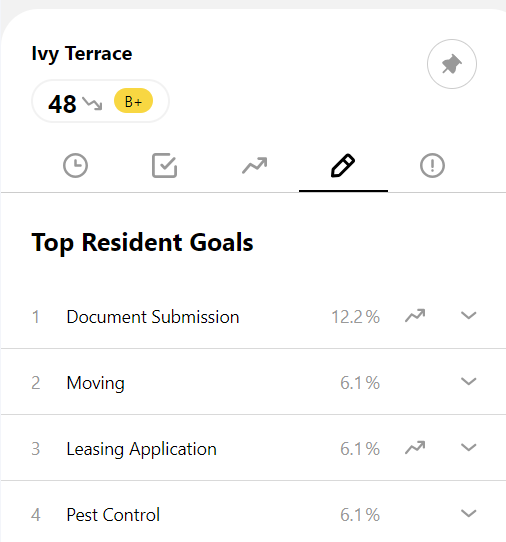
If you are interested in seeing the **most common conversation topics within a community**, you can navigate to the Top Resident Goals page within a specific community by **clicking the pencil icon** inside a community page.
**To get to a community page**, you can click on its name from the **Latest News** area, or by selecting **Communities** from the menu in the top right then selecting a specific community from the list and clicking **Read More**.
 ## **How to interpret**
The content of this list is determined using the following steps:
1. Taking **all conversations from your customers, we determine the intent of each one**, for example "I want to add a new tenant to my lease" or "I want to make a noise complaint".
2. We **group these intents into the customers' high level goals**, such as "Moving", "Maintenance", "Pets", etc, and this is what you'll see in the list on the Top Resident Goals page.
3. You'll see a **percentage and trend line** next to each goal as well:
* the percentage is determined by taking the **number of conversations relating to that theme** and **dividing that by the total number** of conversations during the **time period selected in the date filter**
* the trend line shows the **comparison between the current** percentage to the percentage in the **previous time period**. \
For example, if you have selected "Last week" in the date filter, and over the last week the percentage was 5% and in the previous week it was 4%, then the trend line would be showing an upwards trend. Similarly, if you had selected "Last month" in the date filter, it would be comparing the percentage over the last month to the percentage over the month before that.
Clicking on one of the rows will expand the goal to allow you to see the lower level detail; this includes the **specific intent of the customer's conversation** and **the number of times** it has occurred **during the time period**.
## **How to interpret**
The content of this list is determined using the following steps:
1. Taking **all conversations from your customers, we determine the intent of each one**, for example "I want to add a new tenant to my lease" or "I want to make a noise complaint".
2. We **group these intents into the customers' high level goals**, such as "Moving", "Maintenance", "Pets", etc, and this is what you'll see in the list on the Top Resident Goals page.
3. You'll see a **percentage and trend line** next to each goal as well:
* the percentage is determined by taking the **number of conversations relating to that theme** and **dividing that by the total number** of conversations during the **time period selected in the date filter**
* the trend line shows the **comparison between the current** percentage to the percentage in the **previous time period**. \
For example, if you have selected "Last week" in the date filter, and over the last week the percentage was 5% and in the previous week it was 4%, then the trend line would be showing an upwards trend. Similarly, if you had selected "Last month" in the date filter, it would be comparing the percentage over the last month to the percentage over the month before that.
Clicking on one of the rows will expand the goal to allow you to see the lower level detail; this includes the **specific intent of the customer's conversation** and **the number of times** it has occurred **during the time period**.
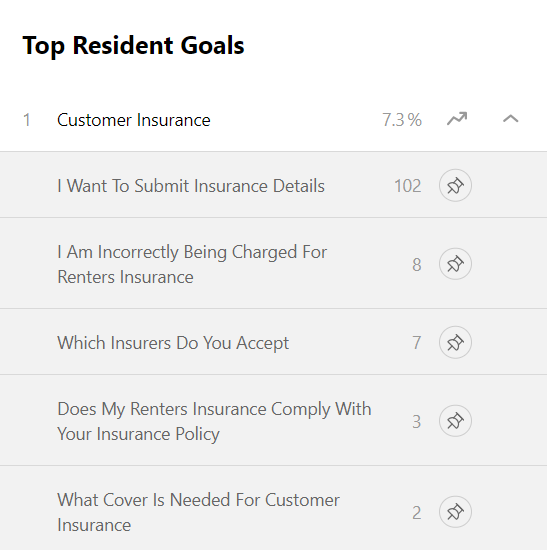 💡**Tip**: Clicking the **pin icon** will allow you to see this particular customer goal in your **My Pins** section where you can **keep an eye on how it is trending**.