> ## Documentation Index
> Fetch the complete documentation index at: https://docs2.travtus.com/llms.txt
> Use this file to discover all available pages before exploring further.
# Customer Summary
## **How to get there**
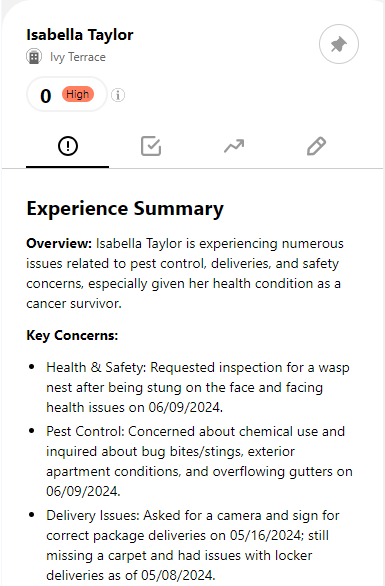
To get a summary of a customer's recent experience and see what email address we are associating with them, you can navigate to a **customer page** and **click on the exclamation mark icon** (and this is the default tab you will land on when navigating to a customer page).
To get to a customer page, you can click on their name from the **Latest News** area, or by selecting **Customers** from the menu in the top right then selecting a specific customer from the list and clicking **Read More**.
## **How to interpret**
* This page provides you with an overview of the customer's total experience, and a list of key concerns. You can use it to quickly see **what recent issues the customer has had**.
* We identify people using a variety of identifiers including email address, telephone number (if provided in the data) and name; it's sometimes useful to see which \*\*email address \*\*the customer name is related to in the data
Note that the summary is unaffected by the date filter; this is to ensure we are always showing the most relevant data.