> ## Documentation Index
> Fetch the complete documentation index at: https://docs2.travtus.com/llms.txt
> Use this file to discover all available pages before exploring further.
# Connecting data sources
# **Overview**
Some things worth noting upfront:
* the more data sources you add, the more complete a picture you get of your customers' experience and the goings-on within your communities.
* different feature bundles include different data sources - contact us at [support@travtus.com](mailto:support@travtus.com) if you’re unsure what your current bundle includes.
## **Benefits**
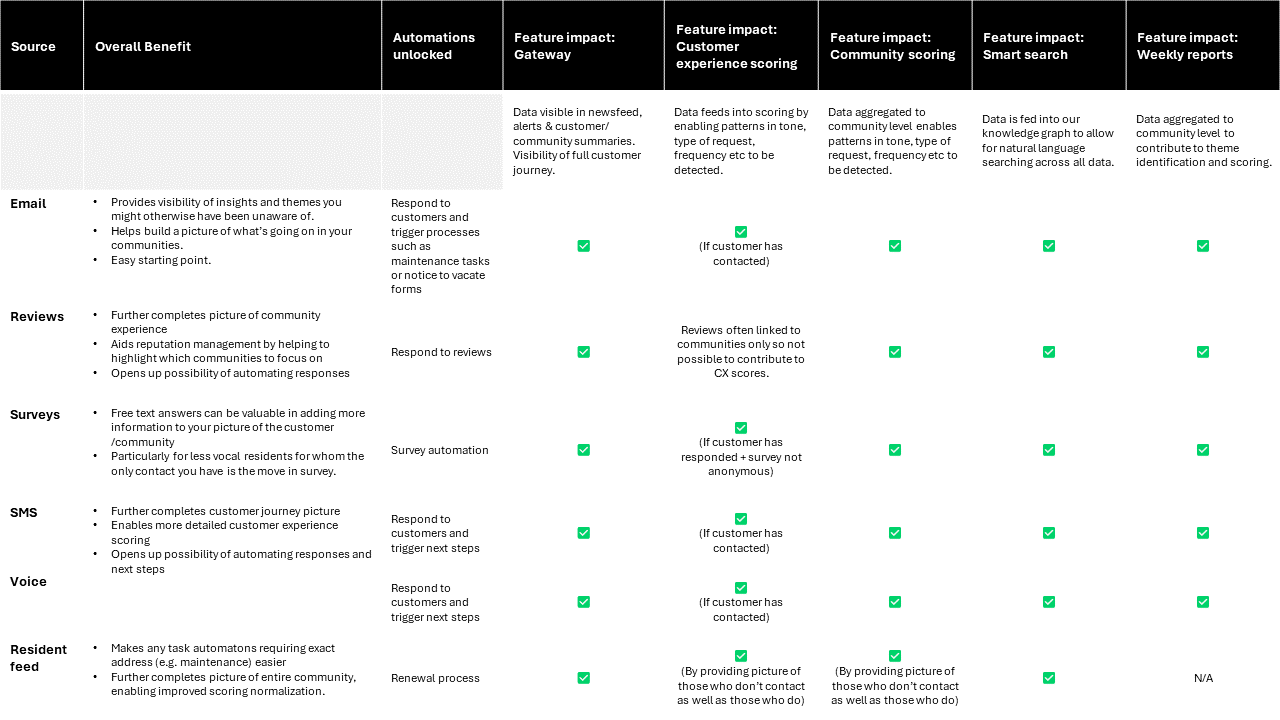
The below table gives you an idea of the benefits of connecting each data source; for further information on each, use the table of contents at the side to navigate through each type.
 ## **Email**
Below is the high level process; you can find technical documentation under the \*\*Technical Guide \*\*tab above.
1. Provide us with the following information:
* Community name
* Unit count
* Community email address(es)
2. Grant permissions to our app.
3. Add the required inboxes to a security group or authorize permissions.
4. Adjust access control.
5. And that's it! The data will start flowing through our models.
### ***Notes***
* \_You can also connect \_**\_individual staff members' \_***inboxes. You'll need to let us know when staff leave/join though.*
* ****It's OK if there are \_multiple inboxes per community \_(e.g. a separate one for leasing vs maintenance, etc)****
## **Google Reviews**
1. [Contact us](mailto:support@travtus.com) to let us know you are interested in this data plug
2. Navigate to [this URL](https://review.travtus.com/review/google/authorize) to authorize access
3. Log in to your Google account (note that the person doing this must have administrative rights)
4. Click Authorize
Data will start flowing through our models and contributing to your community scores and summaries.
*Note that it's also possible to send this data via csv extracts if you'd prefer (though we would recommend the direct connection to ensure data freshness).*
## **Surveys**
1. Let us know you are interested in this data plug
2. Send us a sample extract from your survey provider
3. We'll send you the URL to an area (Amazon S3 bucket) for you to send files (ideally in csv format), and a key to access the area
4. Agree any frequency, naming convention, etc details with us
5. That's it! We'll start picking up the files and ingesting the data.
*Note that anonymous surveys are still worth sending as long as there is a community identifier (e.g. community name).*
## [**Reputation.com**](http://Reputation.com)
If you use [reputation.com](http://reputation.com) and receive the data feed from them, we can ingest this information.
More information on how to connect coming soon.
## **SMS**
If your company uses text messages to speak with residents, we can consume these conversations. In order for us to ingest these data, your options are:
* provide your Twilio (or other provider) account API
* provide the API of your preferred provider
* provide a timed (daily/ hourly) extract
## Voice
If your company uses calls to speak with residents, we can consume these conversations as voice transcripts. In order for us to ingest these data, your options are:
* provide your Twilio (or other provider) account API
* provide the API of your preferred provider
* provide a timed (daily/ hourly) extract
# Resident Feed
1. Let us know you are interested in this data plug
2. Send us a sample extract from your PMS
3. We'll send you the URL to an area (Amazon S3 bucket) for you to send files (ideally in csv format), and a key to access the area
4. Agree any frequency, naming convention, etc details with us
5. That's it! We'll start picking up the files and ingesting the data.
### **General notes on sending csvs**
* No need to send the full list with every extract - a file with changes only (i.e. removals/additions) is fine.
* If there is no information to send, we recommend sending an empty file with headers only.
## **Email**
Below is the high level process; you can find technical documentation under the \*\*Technical Guide \*\*tab above.
1. Provide us with the following information:
* Community name
* Unit count
* Community email address(es)
2. Grant permissions to our app.
3. Add the required inboxes to a security group or authorize permissions.
4. Adjust access control.
5. And that's it! The data will start flowing through our models.
### ***Notes***
* \_You can also connect \_**\_individual staff members' \_***inboxes. You'll need to let us know when staff leave/join though.*
* ****It's OK if there are \_multiple inboxes per community \_(e.g. a separate one for leasing vs maintenance, etc)****
## **Google Reviews**
1. [Contact us](mailto:support@travtus.com) to let us know you are interested in this data plug
2. Navigate to [this URL](https://review.travtus.com/review/google/authorize) to authorize access
3. Log in to your Google account (note that the person doing this must have administrative rights)
4. Click Authorize
Data will start flowing through our models and contributing to your community scores and summaries.
*Note that it's also possible to send this data via csv extracts if you'd prefer (though we would recommend the direct connection to ensure data freshness).*
## **Surveys**
1. Let us know you are interested in this data plug
2. Send us a sample extract from your survey provider
3. We'll send you the URL to an area (Amazon S3 bucket) for you to send files (ideally in csv format), and a key to access the area
4. Agree any frequency, naming convention, etc details with us
5. That's it! We'll start picking up the files and ingesting the data.
*Note that anonymous surveys are still worth sending as long as there is a community identifier (e.g. community name).*
## [**Reputation.com**](http://Reputation.com)
If you use [reputation.com](http://reputation.com) and receive the data feed from them, we can ingest this information.
More information on how to connect coming soon.
## **SMS**
If your company uses text messages to speak with residents, we can consume these conversations. In order for us to ingest these data, your options are:
* provide your Twilio (or other provider) account API
* provide the API of your preferred provider
* provide a timed (daily/ hourly) extract
## Voice
If your company uses calls to speak with residents, we can consume these conversations as voice transcripts. In order for us to ingest these data, your options are:
* provide your Twilio (or other provider) account API
* provide the API of your preferred provider
* provide a timed (daily/ hourly) extract
# Resident Feed
1. Let us know you are interested in this data plug
2. Send us a sample extract from your PMS
3. We'll send you the URL to an area (Amazon S3 bucket) for you to send files (ideally in csv format), and a key to access the area
4. Agree any frequency, naming convention, etc details with us
5. That's it! We'll start picking up the files and ingesting the data.
### **General notes on sending csvs**
* No need to send the full list with every extract - a file with changes only (i.e. removals/additions) is fine.
* If there is no information to send, we recommend sending an empty file with headers only.